Two micro:bit robots play cat and mouse, built in one evening
Two micro:bit robots bought during Covid, a Raspberry Pi, a camera on the ceiling and ArUco markers printed on paper: in one evening, a robotics POC you drive from the web.
I bought these two robots during Covid, to do a bit of electronics. I liked the idea behind the micro:bit, especially with MakeCode and its visual programming, and I wanted to get my kids into it. Then came Kitronik’s :MOVE mini chassis, so the boards could move around. We had already done a small project to drive them with arcade controllers. It was nice, but it took me several months of weekends.
On Saturday, I took them out again. With AI, I built a far more advanced POC in one evening: two robots playing cat and mouse on a table, tracked by a camera on the ceiling, driven from a web page by any visitor, or by an AI when nobody shows up. The brief went out at 5:53 pm, the demo was filmed at 11:30 pm. In between came flashing the robots, spatial detection, and a library I had never heard of: ArUco, the marker one.
# The setup
At the start, there is a Raspberry Pi 4 with 2 GB, a USB webcam fixed at the end of a plank above a white table, and the two robots. My brief fit in one dictated message: a web interface with SpaceX-style telemetry, a first game where one robot has to touch the other, a queue for visitors, driving with the arrow keys or ZQSD, and AI somewhere. The code would live on my Mac and run on the Pi.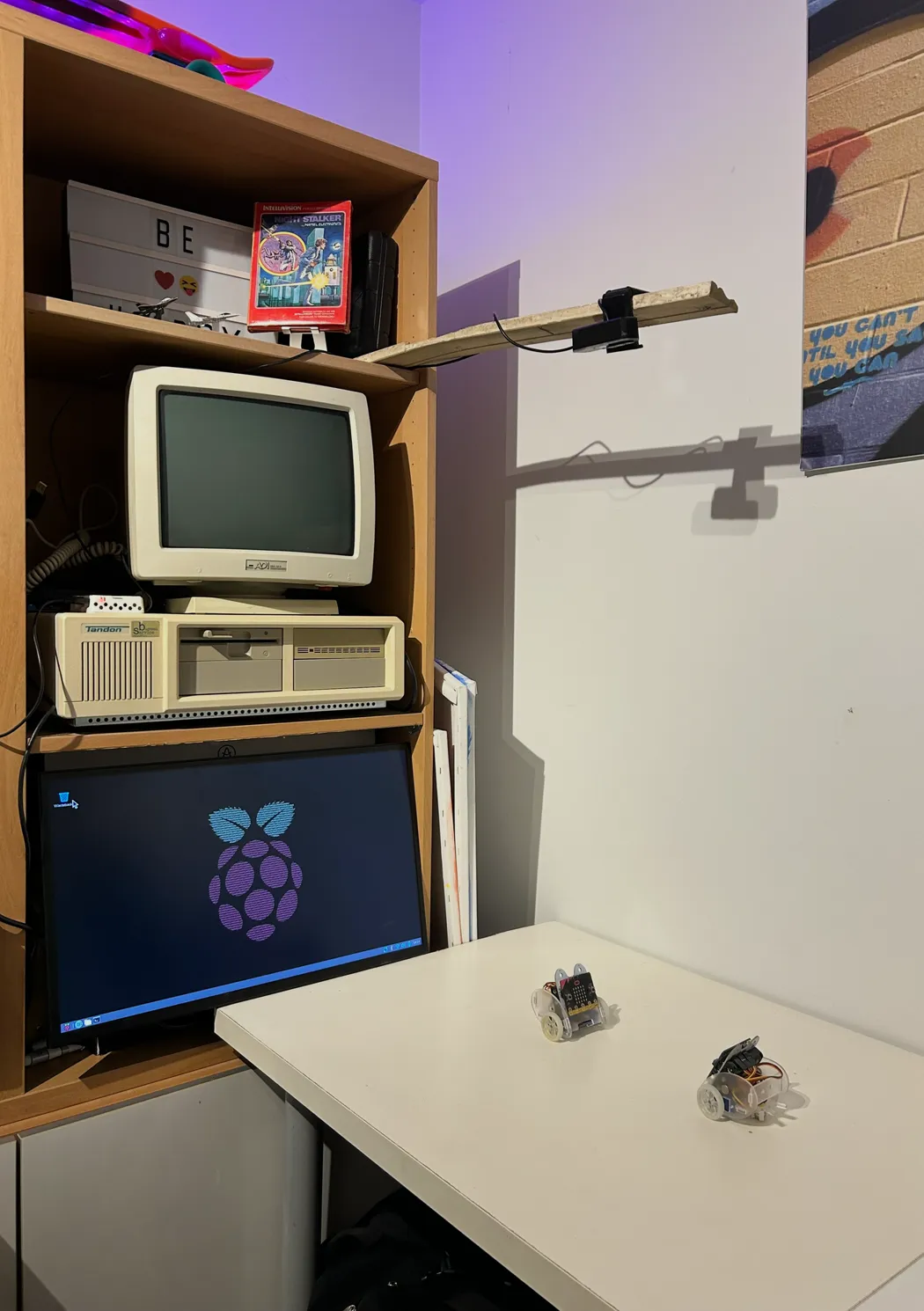
Twenty minutes later, the first commit held the complete system: firmware, server, vision, referee, AI opponent and interface. Nothing had run on a real robot yet.
# The architecture
The Pi does everything. It talks to both micro:bits over Bluetooth Low Energy, with bleak: it sends the wheel speeds 20 times a second and receives acceleration, shocks and temperature. It reads the cameras, referees the game, runs the AI and serves the interface, a FastAPI application. The browser receives the game state ten times a second over WebSocket, and the video as MJPEG.
The firmware knows nothing about left, right or calibration: it applies raw speeds to the two servos. The Pi does the translation, so a robot can be tuned without reflashing it. If no command arrives for 400 ms, the wheels stop.
# Flashing: a sad face and “020”
The first flash failed. The micro:bit showed a 0, a 2 and a sad face: error 020, out of memory. My boards are V1.5s, with 16 KB of RAM, and the MakeCode Bluetooth stack does not fit with all its services. The agent turned off the ones that served no purpose here: over-the-air updates, events, device information and partial flashing. The program started.
The flashing itself needs nothing from me. A script waits for the board to show up on the Mac as a USB drive, copies the compiled firmware onto it, waits for it to remount and checks that it reports no error. During the evening, one of the micro:bits ended up with a blank screen: reflashing it took twenty seconds.
The rest of the lost time was physical. The robots would no longer switch on, and I went out to buy batteries.
# ArUco, the library I did not know
To know where the robots are, the agent suggested ArUco, square black-and-white markers whose detection is built into OpenCV. I did not know it at all. It does exactly what I needed: identify each robot, know which way it is heading, and locate it in space, very fast.
A marker is a 4 × 4 grid inside a black border. The pattern gives an identifier, 1 for robot A and 2 for B, and the order of the four corners gives the orientation: the top edge of the marker is the front of the robot. What remains is going from pixels to centimetres. I click the four corners of the table once in the interface, and a homography projects every point of the image onto an 84 × 55 cm rectangle.
That was my part of the work: print the marker sheet at 100 %, cut out the 4 cm squares, glue them on cardboard, then lay them as a roof on each robot, flat, resting at the front on the edge of the micro:bit. Before that, the agent could not tell which way each wheel was turning: seen from the ceiling, a robot without a marker is a few pixels wide. Once the markers were on, it had each robot make four small moves and worked out the motor wiring from where they went.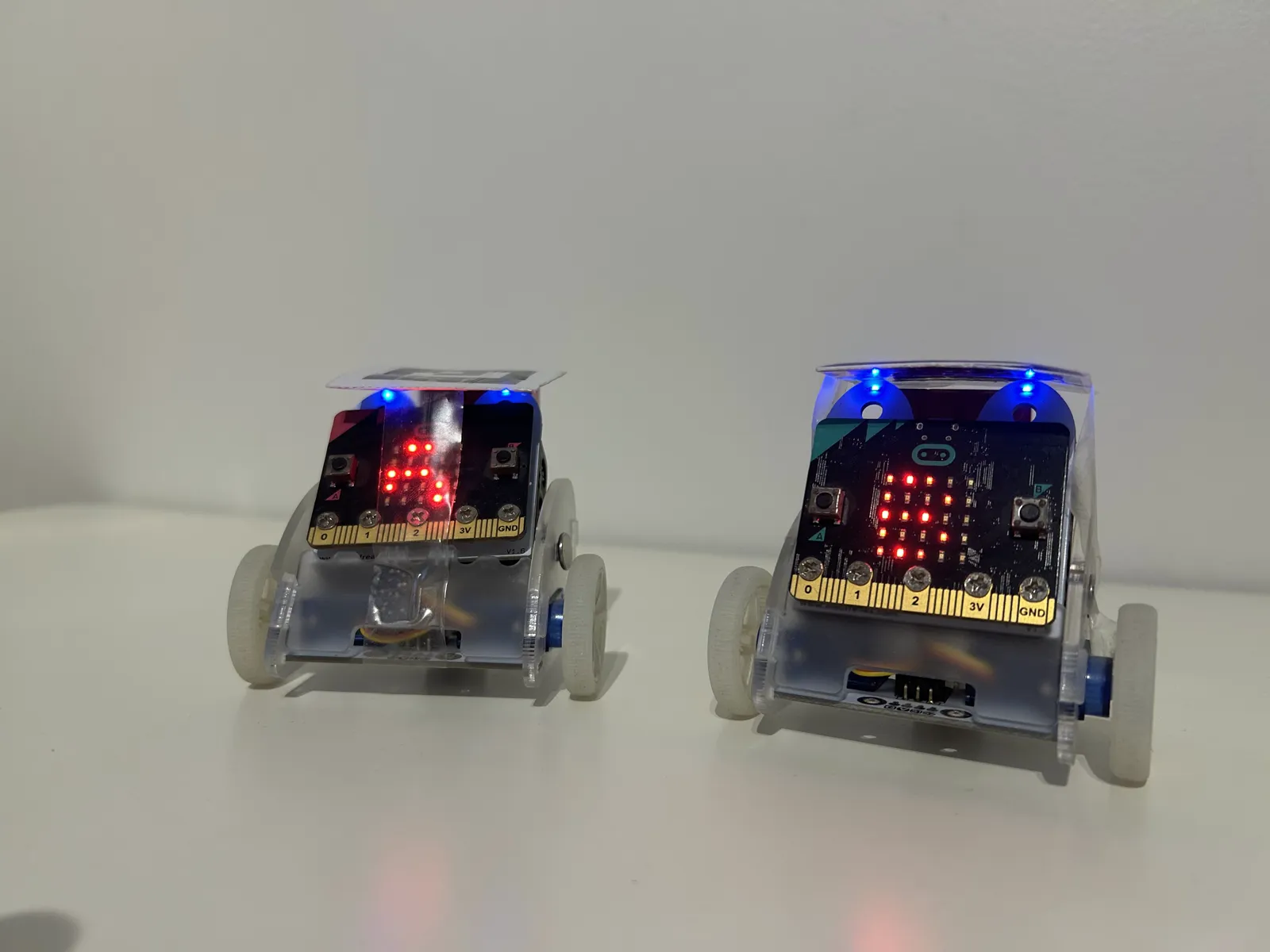
# What broke
During a match against the AI, the game stopped on “B is not seen”, while robot B was right there, switched on. Measured at that moment, its marker was detected in only 51 % of the frames. It was partly hidden, and that is very sensitive: a marker has to be seen whole, clearly, to be recognised. I repositioned it, the agent widened the detector’s thresholding windows, and both robots went to 100 %.
The other surprise came from the camera. The USB webcam’s image was mediocre, and I replaced it on the ceiling with an old Redmi phone running the IP Webcam app. The image was better, but the lag between moving the phone and seeing it on screen looked like a deal-breaker for driving. The cause: the Pi analysed 17 frames a second while the phone sent 30, and the delay piled up in the network buffer. The agent split reading the stream from tracking: one thread drains the camera continuously, the other only processes the most recent frame.
Then the phone switched back to 1080p on its own after the app restarted, and the tracking circles showed up next to the robots. Since then, all the geometry is computed in coordinates relative to the image size, and the server forces 720p again on every connection.
# The camera that does not track
The old laptop sitting at the edge of the table, an eeePC running Arch Linux, has a webcam too. It was tempting to use it for vision. The agent ruled it out: from such a low angle, positions are unusable, and the Atom processor does not have the power for it. That camera does the show: a stand view, and the replay of each tag, rebuilt from the last seconds the Pi keeps in memory for every camera. The laptop only streams when someone is watching.
# Who did what
What I liked in this project is seeing the agent and its code act on the real world. I could see, very concretely, robots moving and behaving. And I was doing in the real world what AI cannot do: printing, cutting, gluing, preparing.
# Where I am
At 11:30 pm, demo mode had the AI playing against the AI, in 45-second matches that chain by themselves, while the agent recorded the three cameras and the interface. From that, it made the edit above, the pictures in this post and a thread I posted the next day on X and Bluesky.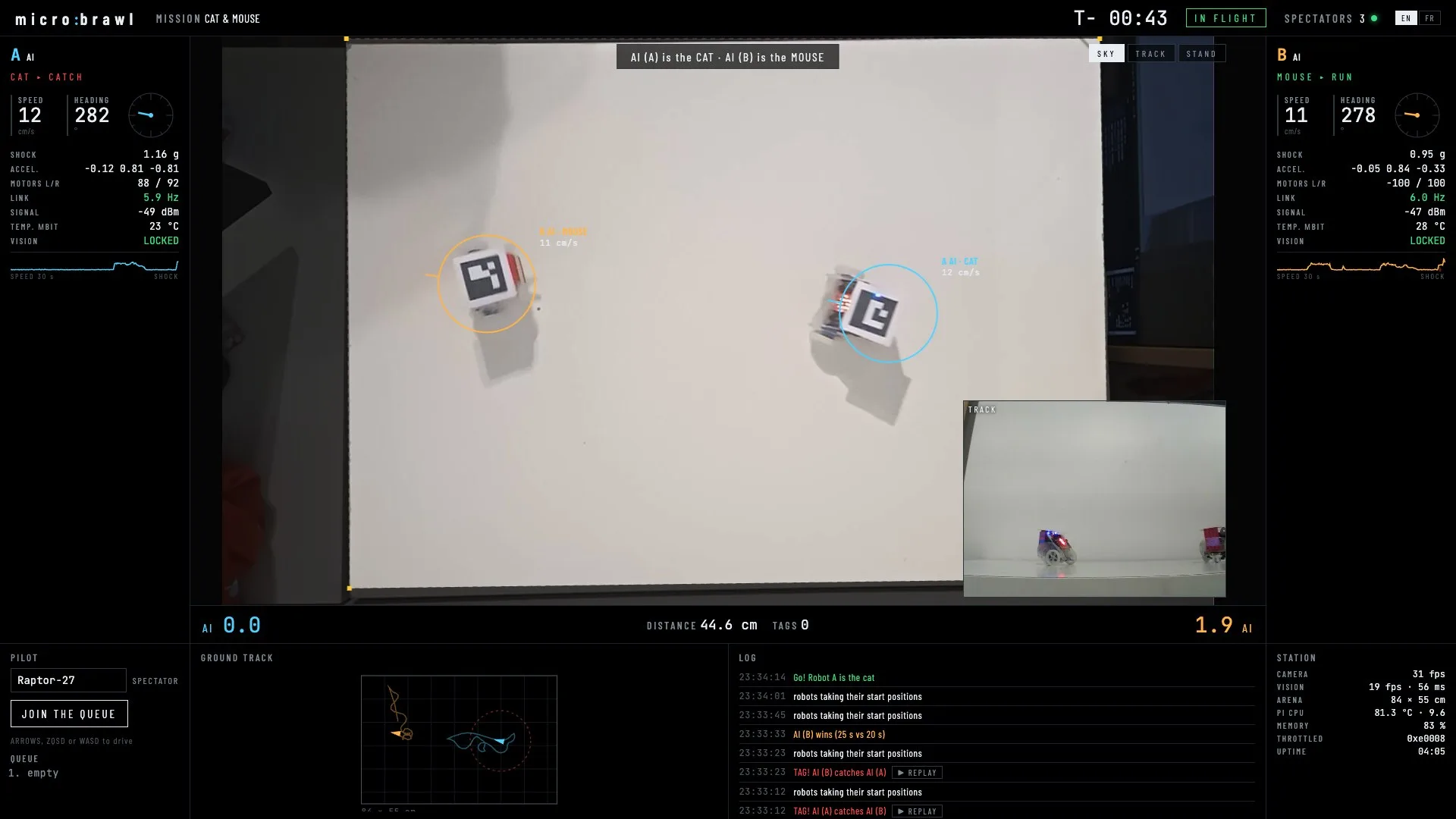
The next morning, the agent fixed what the shoot had revealed. Against the AI, a tag happens about every 10 seconds, and spectators saw almost nothing but replays: they are shorter now and hand back to the live view as soon as play resumes. Losing Bluetooth now pauses the match, instead of letting it go on with a dead robot. Tracking decodes the image at half its size: 15 ms per frame on the Pi instead of 46, for the same detection rate, because the Pi was climbing to 82 °C and throttling. It will still need a fan. These fixes have yet to be checked in a real match.
The code is on GitHub, for information: storagebits/microbrawl.
# What’s next
What would be fun is opening the game up: letting strangers connect and drive the robots, and watching them roll live in my place. I also want to widen it to other robots, a Thymio maybe, or a small indoor drone. The doors are open.
# Links
- Claude Code, the agent that wrote the code
- micro:bit, the robots’ board
- MakeCode, the firmware’s editor and compiler
- Kitronik :MOVE mini, the two-servo chassis
- ArUco, the markers, from the University of Córdoba
- Detection of ArUco markers, in the OpenCV documentation
- bleak, Bluetooth Low Energy in Python
- FastAPI, the Pi’s server
- IP Webcam, the app that turns the phone into a network camera
- Thymio, the next robot, maybe
- The micro:brawl code, on GitHub